Free interactive · Manitoba Grade 6 Science · Earth, Moon and Sun
Seasons Explorer: see why Manitoba has seasons
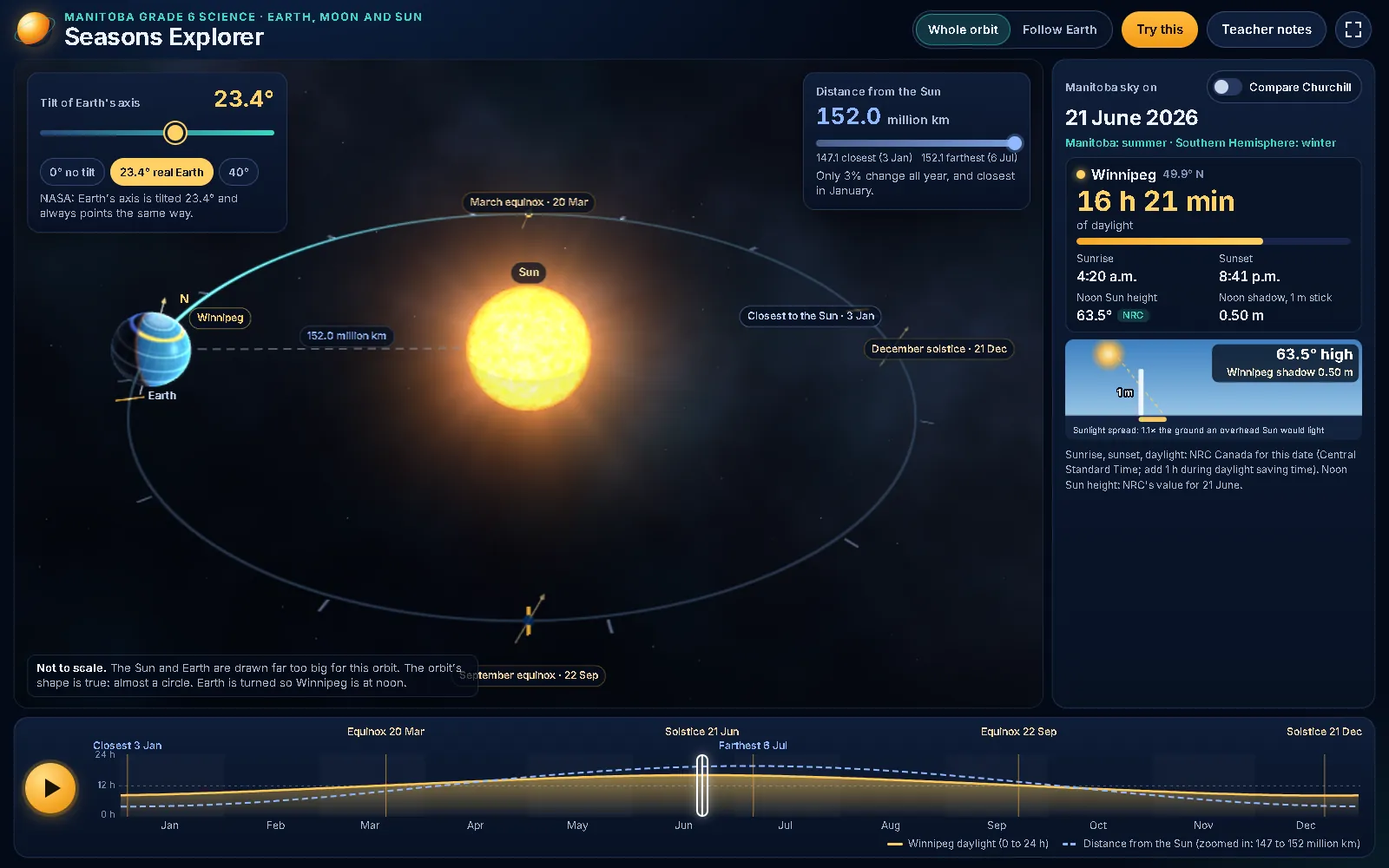
Earth orbits the Sun in 3D while a graph fills in with real 2026 daylight for Winnipeg and Churchill. Students tilt the axis, jump to the solstices, watch a noon shadow stretch and shrink, and test the idea that summer happens because Earth is closer to the Sun. It is free, runs in the browser, and needs no login or email.
Free · No login · No email · Nothing saved or sent
Milestone Teachers · Manitoba Grade 6 Science · Last reviewed
Open Seasons Explorer (free, full screen) · Manitoba's renewed Grade 6 Science: the teacher's guide
What it is
- A 3D orbit you can turn. Earth travels its nearly circular orbit around the Sun. Drag to look from any side, or choose Follow Earth to fly in close to the tilted axis and the line between day and night.
- Real Manitoba daylight. Sunrise, sunset and hours of daylight for every day of 2026 in Winnipeg and Churchill, from National Research Council Canada tables, drawn as a graph that fills in as the year plays.
- A noon shadow stick. The shadow of a 1 m stick at solar noon in Winnipeg, with the noon Sun's height, so students can compare 21 June with 21 December.
- A what-if tilt control. Slide the tilt from 0° to 40°. Any tilt other than Earth's real 23.4° switches to a clearly labelled model, so students never mistake a what-if for a measurement.
- Three built-in investigations. Try this: the shadow stick, "Closer = warmer?" (the distance hypothesis, tested with the dates Earth is closest and farthest), and "No tilt".
- Teacher notes inside. Where it fits in the unit, the misconception to surface, questions to ask, how to run it, where every number comes from, and its honest limits.
- Free. No login, no email, no sign-up.
- Runs in any current browser (Chrome, Edge, Firefox, Safari). If a device cannot show 3D, it shows a flat top view instead.
- Nothing a student does is saved or sent anywhere.
How to use it in class
- Project it full screen. Open the lab on the classroom display. It works with a mouse, a touch screen or the keyboard: Space plays or pauses, the arrow keys move a day, Page Up and Page Down move a week, and T switches the tilt between 0° and 23.4°.
- Ask for a prediction first. Before pressing Play, ask when Earth is closest to the Sun. Record the class's predictions, then check the distance card: closest on 3 January, farthest on 6 July.
- Run one investigation at a time. Open Try this and work through the shadow stick, the distance hypothesis and the no-tilt test. Each asks students to predict, look, then explain with what they saw.
- Finish with the claim. Students write a claim about what causes the seasons, backed by two pieces of evidence from the screen: the daylight graph and the noon shadow.
Curriculum link
Built for the Earth-Moon-Sun outcomes of Manitoba's renewed Grade 6 Science curriculum.
- SCI.6.E.10: Tilt, orbit, daylight and the seasons.
Demonstrate an understanding of the relationship among the tilt of Earth’s axis, revolution around the Sun, number of daylight hours, and seasonal change.
The whole lab: the tilt control, the orbit and the daylight graph side by side. - SCI.6.E.9: Month, year and seasons.
Demonstrate the understanding that the meaning of human time systems is tied to the motions of Earth around the Sun and the Moon around Earth.
Solstices, equinoxes, revolution and orbit, with the 2026 dates marked on the orbit. - SCI.6.E.8: Rotation and the length of a day.
Demonstrate an understanding of the rotational motion of Earth, and its role in defining the length of a day.
Sunrise, sunset and the length of the day for any date.
Contains information from the Government of Manitoba, licensed under the OpenMB Information and Data Use License (Manitoba.ca/OpenMB). OpenMB licence.
Manitoba's renewed Grade 6 Science: the teacher's guide
Units for this year
The full Earth, Moon and Sun unit uses Seasons Explorer in its lessons on shadows, the cause of the seasons, and tilt and daylight, and includes an offline copy of it.
- Manitoba Grade 6 Science NEW Curriculum Space Unit | Earth, Moon & Sun. SCI.6.E.8 to E.11: day and night, the length of a day, month and year, Moon phases, the Sun as a star, and the cause of the seasons. 8 lessons: 84 slides, a 65-page student workbook, an 80-page accommodated edition, a 37-page teacher guide with answer key, and an offline copy of Seasons Explorer. See the current price and currency on the product page before purchasing.
Honest limits
- Sizes are not to scale; the shape of the orbit is.
- The globe shows day, night and a latitude-longitude grid, not continents.
- The data covers 2026. In other years the dates differ by a day or so.
- The model leaves out weather, clouds and the lag between the solstice and the warmest weeks.
Credits
- Daylight data: National Research Council Canada, Sunrise/sunset calculator: full-year 2026 tables for Winnipeg and Churchill, and sun positions for the 21st of each month.
- Tilt: NASA Science, Earth: Facts (23.4°).
- Distances: NASA Space Place, What Causes the Seasons? (closest and farthest distances).
- Dates: U.S. Naval Observatory, Earth's Seasons and Apsides (solstices, equinoxes, closest and farthest points, 2026).
- Software and type: three.js (MIT License); Inter by Rasmus Andersson (SIL Open Font License 1.1).
- Made by: An independent teaching resource from Milestone Teachers.
Sources
Checked against the sources below on 29 September 2026.
- National Research Council Canada: Sunrise/sunset calculator
- NASA Science: Earth: Facts
- NASA Space Place: What Causes the Seasons?
- U.S. Naval Observatory: Earth's Seasons and Apsides
- Manitoba Education and Early Childhood Learning: Science: Grade 6 (English Program)